
Home / Wide-Format Printers / Epson SureColor
Epson · Wide-Format Plotter
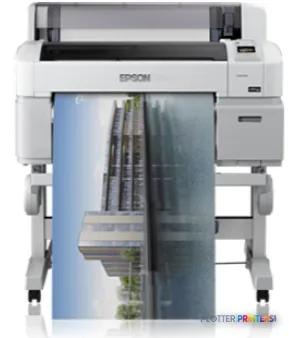
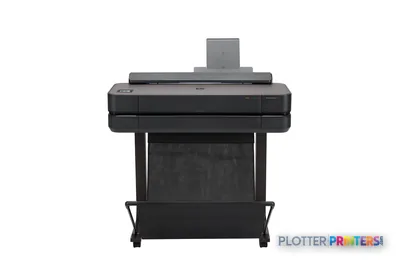
Epson SureColor T3070
24" technical / CAD plotter
- ModelT3070
- Prints24" wide
- Score71/100
Authorized Epson dealerGenuine hardware & ink
Manufacturer warrantyExtension plans available
Free shippingContinental U.S.
Plotter specialistsAEC experts, not just sellers
Analyst take
- The Epson T3070 is a color inkjet designed around A1 output, with a listed maximum print size of 23" x 33".
- Its 24" roll capability does not make it a listed 24" x 36" D-size plan printer.
- Cut-sheet and roll-paper support suits mixed review, markup, map, and technical-document work.
Not sure if the T3070 is right for you?
Compare key specs and an AI analyst read-out against similar models.
- Wide-format reach Prints up to 24" wide on rolls and sheets.
- Fine detail 2880 x 1440 DPI maximum resolution for crisp line work.
- Ink platform Black, Cyan, Magenta, Matte black, Yellow.
- Verified specs 3 specs checked against the manufacturer datasheet.
- Analyst score Scores 71/100 in our class-relative rating.
Overview
Built for the work
Epson T3070, Inkjet, 2880 x 1440 DPI, Black, Cyan, Magenta, Matte black, Yellow, A1 (594 x 841 mm), A1, A2, A3, A4, B2, B3, B4
- 24″Max print width
- 5Ink channels
- 2,880 dpiMax resolution
Spec Analysis
overall
overall
Where it performs best
Size / Fit
93
Print Cost
81
Media Handling
80
Best overall in its class right now. How we grade →
Expert analysis
What you should know

Key takeaways
- The Epson T3070 is a color inkjet designed around A1 output, with a listed maximum print size of 23" x 33".
- Its 24" roll capability does not make it a listed 24" x 36" D-size plan printer.
- Cut-sheet and roll-paper support suits mixed review, markup, map, and technical-document work.
- Epson UltraChrome XD inks provide the black and color channels needed for technical linework and colored coordination output.
- IT teams should test real CAD and PDF files because the supplied data does not establish compatibility with a specific accounting, authentication, or cloud workflow.
It is 4:45 p.m., somebody needs a marked-up sheet back in hand, and the printer must fit the job rather than turn the print room into a small weather system. The Epson T3070 is a compact color inkjet for technical documents, small-format presentation output, and A1-based drawing work.
Its important limit is plain: the listed maximum print size is A1, or 23″ x 33″. That makes it a credible fit for teams working to ISO sheet standards, but not a substitute for a printer assigned to 24″ x 36″ U.S. D-size plan sets. Paper width alone does not settle that argument. The finished sheet does.
A1 (23" x 33" (594 x 841 mm))Maximum listed print sizeA practical boundary for U.S. plan-set workflows.
24" (610 mm)Roll media widthSupports roll-fed technical output within the listed maximum print-size specification.
2880 x 1440 DPIMaximum resolutionUseful where fine CAD linework and small annotations need careful reproduction.
54 WTypical power consumptionA reasonable consideration for office placement and managed energy planning.
Where the Epson T3070 fits in AEC work
The Epson T3070 suits architects, engineers, surveyors, and project teams producing color-coded coordination sheets, GIS maps, review drawings, detail sheets, and smaller presentation output. It accepts both cut sheets and roll paper, which matters when a user needs a quick A3 review print one minute and a longer technical sheet the next.
The five-color ink set includes black, matte black, cyan, magenta, and yellow, using Epson UltraChrome XD inks. In practical AEC terms, that gives the machine the ingredients needed for black linework alongside colored markups and discipline overlays. It is not proof that every PDF will print perfectly on the first try. Driver settings, source-file construction, and paper choice still get a vote. They always do.
Its 0.003″–0.059″ media-thickness range also gives it some flexibility for ordinary technical papers and heavier media within that specification. Bottom line: this is for controlled technical output and review work, not a machine chosen merely because it has a 24-inch roll.
The limitation that matters before a deadline
AEC buyers should start with sheet geometry. The T3070’s listed maximum is A1 at 23″ x 33″, while many U.S. construction workflows still expect 24″ x 36″ D-size sheets. If your bid sets, permit sets, field issues, or consultant exchanges regularly require D-size output, this is the wrong production format to force into service. Cropping a border at 4:45 p.m. is not a workflow. It is an apology.
The machine has 256 MB of internal memory, an LCD, USB Type-A connectivity, and bundled EpsonNet software. Those are useful operational facts, but they do not establish support for a particular cloud platform, accounting package, authentication method, or PDF workflow. Print-room and IT teams should validate those requirements with their actual CAD, BIM, PDF, and network environment.
For a cross-brand comparison in the same 24-inch class, review the Canon GP-200 24-in or use the side-by-side comparison tool. Bottom line: confirm the sheet sizes your clients demand before comparing resolution or color count.
Office fit, maintenance, and buying checks
At 41.3″ wide, 32″ deep, and 44.4″ high, the Epson T3070 needs a defined home rather than a spare corner beside the coffee machine. It weighs 116.8 lbs, produces a listed 50 dB while printing, and carries ENERGY STAR certification. Its stated standby consumption is 0.4 W and PowerSave consumption is 3 W.
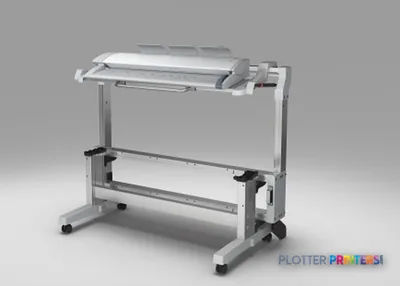
Ask the seller to demonstrate your own PDFs: a dense civil base map, a Revit-exported sheet with fine text, a scanned redline, and a color coordination drawing. Confirm roll loading, cut-sheet handling, driver deployment, network controls, service response, and replacement procedures for Epson UltraChrome XD consumables. Also check whether the optional scanning arrangement fits the copying and archive work you actually do.
For context on class positioning, see the technical-printer class ranking and how we evaluate print hardware. Bottom line: local service competence and a real-file demonstration matter more than a tidy brochure page.
Useful comparisons and buying tools
Canon GP-200 24-inA same-class cross-brand comparison point.Canon GP-2000 24-inAnother 24-inch option to evaluate against your output requirements.Technical printer class rankingSee where this category sits in the broader market.How we rate printersReview the operational criteria behind the comparisons.
The read
The Epson T3070 makes sense for AEC teams producing A1-based technical output, color review sheets, maps, and office-side drawings where cut-sheet flexibility matters. It is less appropriate for firms whose normal deliverable is a 24″ x 36″ D-size construction sheet or whose workload depends on production-scale finishing and set handling. Buy it for the work it is specified to do. Printers are remarkably poor at fixing a mismatch after the purchase order is signed.
Spec analysis
How the specs grade
Overall performance
- This printer
- Epson SureColor T3475
Category leaders best technical / CAD plotters, by dimension
Verified specifications
The specs that decide it
| Maximum print width | 24 in |
|---|---|
| Print technology | Inkjet |
| Maximum resolution | 2880 × 1440manufacturer-verified |
| Printing colors | Black, Cyan, Magenta, Matte black, Yellow |
| Internal memory | 512MB for Main; 128MB for Networkmanufacturer-verified |
| Maximum print size | A1 (594 x 841 mm) |
| Media thickness | 0.08 – 1.5 mm |
| Sound level (printing) | 50 dB |
| Power consumption | Approximately 54manufacturer-verified |
manufacturer-verified = checked against the manufacturer’s official datasheet, not aggregator data. Everything else is standards-body / catalog data we consider reliable.
Specifications
Full technical detail
Print technologyInkjet
Max resolution2880 x 1440 DPI
Max print width24"
ColorColor
ConnectivityUSB
Printing
| Color | Yes |
|---|---|
| Printing colors | Black, Cyan, Magenta, Matte black, Yellow |
| Print technology | Inkjet |
| Maximum resolution | 2880 x 1440 DPI |
Performance
| Display | LCD |
|---|---|
| Internal memory | 256 MB |
| Built-in display | Yes |
| Sound pressure level (printing) | 50 dB |
Paper handling
| Cut sheets | Yes |
|---|---|
| Roll paper | Yes |
| Media thickness | 0.08 – 1.5 mm |
| Maximum print size | A1 (594 x 841 mm) |
| Media width (rolls) | 610 mm |
| ISO A-series sizes (A0…A9) | A1, A2, A3, A4 |
| ISO B-series sizes (B0…B9) | B2, B3, B4 |
Ports & interfaces
| USB port | Yes |
|---|---|
| USB connector | USB Type-A |
| USB 2.0 ports quantity | 1 |
Weight & dimensions
| Depth | 32" (813 mm) |
|---|---|
| Width | 41.3" (1050 mm) |
| Height | 44.4" (1128 mm) |
| Weight | 116.8 lbs (53 kg) |
Power
| Power consumption (standby) | 0.4 W |
|---|---|
| Power consumption (typical) | 54 W |
| Power consumption (PowerSave) | 3 W |
Packaging data
| Bundled software | EpsonNet |
|---|---|
| Drivers included | Yes |
Sustainability
| Sustainability certificates | ENERGY STAR |
|---|
Everything that fits the Epson SureColor T3070
The full supplies hub lists every cartridge, printhead, roll and accessory verified against the manufacturer's own documentation for this machine.
15 ink cartridges · 12 paper & media items · 2 accessories
Epson SureColor T3070 ink and paper →Supplies
Compatible ink, printheads & media
Genuine consumables that fit the Epson SureColor T3070 24-in — only the cartridges, printheads and media compatible with this model.
Ink Cartridges 15
 Epson Singlepack UltraChrome XD Photo Black T692100 (110ml)
 Epson Singlepack UltraChrome XD CyanT692200(110ml)
 Epson Singlepack UltraChrome XD MagentaT692300(110ml)
 Epson Singlepack UltraChrome XD YellowT692400(110ml)
 Epson Singlepack UltraChrome XD Matte BlackT692500(110ml)
 Epson Singlepack UltraChrome XD Photo BlackT693100(350ml)
 Epson Singlepack UltraChrome XD CyanT693200(350ml)
 Epson Singlepack UltraChrome XD MagentaT693300(350ml)
 Epson Singlepack UltraChrome XD YellowT693400(350ml)
 Epson Singlepack UltraChrome XD Matte BlackT693500(350ml)
 Epson Singlepack UltraChrome XD Photo BlackT694100(700ml)
 Epson Singlepack UltraChrome XD CyanT694200(700ml)
 Epson Singlepack UltraChrome XD MagentaT694300(700ml)
 Epson Singlepack UltraChrome XD YellowT694400(700ml)
 Epson Singlepack UltraChrome XD Matte BlackT694500(700ml)
Paper & Media 12
 Representative image28LB Inkjet Coated Matte Paper (748)Representative image46LB Inkjet Coated Matte Paper (747)Representative image6.5mil Matte Coated Paper w/ PSA (746PSA)Representative image36LB Inkjet Coated Matte Paper (746)Representative image24LB Inkjet Coated Matte Paper (745)Representative image20LB High Brite Inkjet Bond Paper (740)Representative image20LB Inkjet Bond Paper (Tinted) (732)Representative image24LB Inkjet Bond Paper (731)Representative image20LB Inkjet Bond Paper (730)Representative image24LB Inkjet Coated Matte Paper Economy (714)Representative image20LB Engineering Vellum (471)Representative imageWSL 28LB Simple Inkjet Coated Matte Paper (C2S) (448)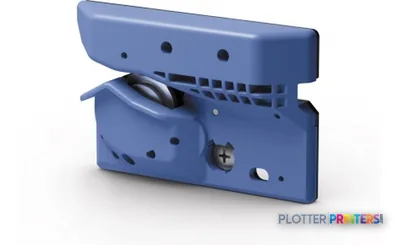
Questions
Straight answers
Can the Epson T3070 print 24" x 36" D-size construction drawings?
The listed maximum print size is A1, or 23″ x 33″. Buyers who regularly need 24″ x 36″ sheets should treat that as a firm workflow limitation and verify alternatives built for that format.
What AEC work is the Epson T3070 suited to?
It is suited to A1-based technical drawings, color-coded coordination sheets, GIS maps, review prints, and smaller presentation-oriented documents. Its cut-sheet and roll-paper support helps teams handling varied document types.
What inks does the Epson T3070 use?
The compatible ink family is Epson UltraChrome XD. The listed printing colors are black, cyan, magenta, matte black, and yellow.
Will it fit in a typical project office?
The printer measures 41.3″ wide, 32″ deep, and 44.4″ high, and weighs 116.8 lbs. Allow working space for loading paper, collecting output, and routine operator access rather than measuring only the machine footprint.
What should IT and print-room staff test before deployment?
Test actual CAD exports, BIM-derived PDFs, scanned redlines, and color coordination files. Also confirm driver deployment, EpsonNet use, USB requirements, network controls, and the local service process.
Ready to put the Epson SureColor T3070 to work?
Configuration, media and a quote tailored to your workflow — from AEC plotter specialists.