
Home / Wide-Format Printers / Canon imagePROGRAF
Canon · Wide-Format Plotter
Canon imagePROGRAF PRO-6100S
60" color graphics & photo printer
- ModelPRO-6100S
- Prints60" wide
Genuine OEM hardwareAuthorized U.S. distribution
Manufacturer warrantyExtension plans available
Free shippingContinental U.S.
Plotter specialistsAEC experts, not just sellers
Analyst take
- The Canon PRO-6100S supports roll media from 8 inches to 60 inches as well as cut sheets.
- Its seven-cartridge color system is most relevant to maps, presentation graphics, renderings, and color-coded coordination documents.
- A 2400 x 1200 DPI maximum resolution supports detailed output, but file preparation and media handling still affect productive throughput.
Not sure if the PRO-6100S is right for you?
Compare key specs and an AI analyst read-out against similar models.
- Wide-format reach Prints up to 60" wide on rolls and sheets.
- Fine detail 2400 x 1200 DPI maximum resolution for crisp line work.
- Ink platform Cyan, Gray, Magenta, Matte black, Photo black, Photo cyan, Photo magenta, Yellow.
- Connectivity Wi-Fi + Ethernet for shared team printing.
- Verified specs 10 specs checked against the manufacturer datasheet.
Overview
Built for the work
Canon imagePROGRAF PRO-6100S, Inkjet, 2400 x 1200 DPI, Cyan, Gray, Magenta, Matte black, Photo black, Photo cyan, Photo magenta, Yellow, A0 (841 x 1189 mm), A0, A1, 0.07 – 0.8 mm
Expert analysis
What you should know

Key takeaways
- The Canon PRO-6100S supports roll media from 8 inches to 60 inches as well as cut sheets.
- Its seven-cartridge color system is most relevant to maps, presentation graphics, renderings, and color-coded coordination documents.
- A 2400 x 1200 DPI maximum resolution supports detailed output, but file preparation and media handling still affect productive throughput.
- There is no scanning or copying function, so it is not a replacement for a wide-format multifunction workflow.
- The single input tray means operators should plan media changes around mixed-stock work.
- IT teams should verify the listed Windows and Mac OS support against their current managed environment.
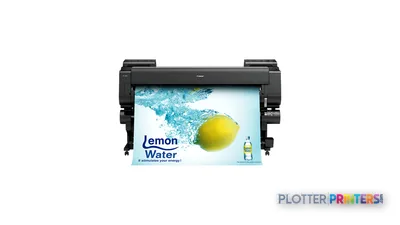
A coordination drawing can be technically correct and still fail the field test if the colored utilities, phasing bands, or markup layers collapse into one another. The Canon PRO-6100S is a 60-inch inkjet platform for AEC teams that need large color output: presentation plans, GIS mapping, site graphics, renderings, and color-coded review sets alongside ordinary plan production.
Its 2400 x 1200 DPI maximum resolution and seven-cartridge color system give it the technical basis for detailed graphic work, while 8-inch to 60-inch roll media and cut-sheet support make it adaptable to a varied print room. The practical question is less whether it can render an A0 sheet than whether your workflow needs wide color graphics often enough to justify a dedicated 60-inch device.
60" (152.4 cm)Maximum roll widthFor full-width plans, boards, maps, and graphics.
2400 x 1200 DPIMaximum resolutionRelevant to fine CAD linework and detailed color graphics.
500 GBInternal storageLocal storage is available for queued work.
0.003"–0.031" (0.07 – 0.8 mm)Media thicknessConfirm the specific media you intend to run.
Where the 60-inch format earns its space
This machine fits architecture studios producing presentation boards and full-size drawing packages, engineering groups issuing color utility, grading, or phasing plans, and construction teams that need large visual aids for coordination meetings. Borderless printing is supported for A0 and A1 media sizes, which can be useful where the image is intended to reach the edge rather than sit within a document margin.
The media range deserves more attention than a resolution figure. It accepts roll widths from 8 inches through 60 inches, supports rolls up to 708.7 inches long, and also accepts cut sheets. That flexibility matters when a print room moves between reduced check plots, wide exhibit graphics, and occasional rigid-feeling heavier media within the stated thickness range. There is one input tray, so this is not a substitute for an environment that expects multiple media sources to remain loaded and available without operator choices.
For a narrower production need, the Canon PRO-4600 44-in may be the more proportionate format. Teams that consistently require 60-inch output but are comparing adjacent Canon options should also examine the Canon PRO-4100S 60-in on their actual media and files.
Color work, document work, and the limits of the platform
The seven-cartridge system uses cyan, gray, magenta, matte black, photo black, photo cyan, photo magenta, and yellow. That palette is most relevant when drawings contain photographic renderings, aerial imagery, shaded models, or color-coded systems—not simply when a PDF happens to contain a colored logo. The difference shows up where graphics live: at the cyan edge of a utility overlay against a pale base map.
There is no built-in display, scanner, or copying capability. Firms replacing an aging wide-format multifunction device should treat that as a workflow distinction, not a minor accessory omission: walk-up scan-to-file, plan copying, and legacy-document capture require another process or device. The PRO-6100S is therefore better understood as a wide-format output engine than as a reprographics hub.
Connectivity includes Wi-Fi, Ethernet LAN through one RJ-45 port, and USB Type-A. It has 3 GB of RAM and a 500 GB HDD. The listed operating-system support includes Windows 7 through Windows 10 variants and Mac OS X 10.7 through 10.11; IT teams should validate driver and security compatibility against their current managed desktop environment before standardizing on it.
Operational fit for an AEC print room
At 372.6 lbs, with a stated depth of 38.7 inches and height of 46 inches, the PRO-6100S needs a deliberate location rather than an improvised corner. Its 49 dB printing sound-pressure specification suggests an office-adjacent installation may be feasible, while the 35 dB quiet-mode figure offers another operating option; either way, assess the actual room, work patterns, and access for media loading.
This is particularly well suited to departments where wide color output is a regular part of the project record or presentation process. It may be less appropriate for a plan room centered on copying and scanning, or for teams whose typical work never exceeds 44 inches. For a current 60-inch Canon comparison, use the side-by-side comparison with the Canon PRO-4100S 60-in rather than assuming similar width means identical workflow fit.
Continue the evaluation
Canon PRO-4100S 60-inCompare another 60-inch Canon option for wide color output.Canon PRO-4600 44-inConsider a narrower format where 60-inch media is not a routine requirement.Wide-format class rankingReview the machine in the context of its class.How we assess printersRead the criteria behind our workflow-focused analysis.
The read
The Canon PRO-6100S makes sense when full-width color plans, maps, boards, and visual coordination materials are recurring AEC deliverables—not occasional exceptions. Its 60-inch media capability, cut-sheet support, and seven-color inkjet configuration give it a credible place in a color-oriented print room. The trade-off is clear: it does not scan or copy, has one input tray, and requires IT validation against present-day environments. Buy it for wide color output; do not select it expecting a multifunction reprographics workflow.
Verified specifications
The specs that decide it
| Print technology | Canon Bubblejet on Demand, 12 pigment inks |
|---|---|
| Maximum resolution | 2,400 x 1,200 dpi |
| Maximum roll width | 60 in (1,524 mm) |
| Maximum print length | 84 in (2,133.6 mm) / 59.1 ft (18 m)manufacturer-verified |
| Ink cartridge capacity | 330 mlmanufacturer-verified |
| Ink channels | 12 (incl. dual gray + Chroma Optimiser) |
| Media types | Plain, CAD tracing, coated, CAD translucent matte filmmanufacturer-verified |
| Connectivity | Gigabit Ethernet, USB 2.0, Wi-Fi 802.11b/g/n |
| Memory / internal storage | 3 GB RAM / 500 GB drivemanufacturer-verified |
| Dimensions / weight | 78.7 x 38.7 x 46 in; 377 lb (171 kg) |
manufacturer-verified = checked against the manufacturer’s official datasheet, not aggregator data. Everything else is standards-body / catalog data we consider reliable.
Specifications
Full technical detail
Print technologyInkjet
Max resolution2400 x 1200 DPI
Max print width60"
ColorColor
ConnectivityEthernet (Gigabit LAN), USB, Wi-Fi
Use casePhoto / Fine Art
Printing
| Color | Yes |
|---|---|
| Printing colors | Cyan, Gray, Magenta, Matte black, Photo black, Photo cyan, Photo magenta, Yellow |
| Print technology | Inkjet |
| Maximum resolution | 2400 x 1200 DPI |
| Borderless printing | Yes |
| Number of print cartridges | 7 |
Performance
| RAM capacity | 3 GB |
|---|---|
| Certification | CE, EAC, TUV, CB |
| Product color | Black |
| Storage media | HDD |
| Built-in display | No |
| Internal storage capacity | 500 GB |
| Sound power level (standby) | 6.7 dB |
| Sound pressure level (printing) | 49 dB |
| Sound pressure level (quiet mode) | 35 dB |
Paper handling
| Cut sheets | Yes |
|---|---|
| Media thickness | 0.003"–0.031" (0.07 – 0.8 mm) |
| Maximum print size | A0 (33" x 47" (841 x 1189 mm)) |
| Maximum roll width | 60" (152.4 cm) |
| Maximum roll length | 708.7" (18 m) |
| Media width (rolls) | 8"–60" (203.2 – 1524 mm) |
| Maximum roll diameter | 6.69" (17 cm) |
| Borderless printing media sizes | A0, A1 |
Ports & interfaces
| Wi-Fi | Yes |
|---|---|
| USB port | Yes |
| Ethernet LAN | Yes |
| USB connector | USB Type-A |
| RJ-45 ports quantity | 1 |
| USB 2.0 ports quantity | 1 |
Weight & dimensions
| Depth | 38.7" (984 mm) |
|---|---|
| Width | 7.83" (199 mm) |
| Height | 46" (1168 mm) |
| Weight | 372.6 lbs (169 kg) |
Operational conditions
| Operating temperature (T-T) | 15 – 30 °C |
|---|---|
| Operating relative humidity (H-H) | 10 – 80% |
Copying
| Copying | No |
|---|
Scanning
| Scanning | No |
|---|
Logistics data
| Harmonized System (HS) code | 84433210 |
|---|
Packaging data
| Package depth | 36" (915 mm) |
|---|---|
| Package width | 87.7" (2227 mm) |
| Package height | 40.2" (1022 mm) |
| Package weight | 467.4 lbs (212 kg) |
| Drivers included | Yes |
System requirements
| Mac operating systems supported | Mac OS X 10.10 Yosemite, Mac OS X 10.11 El Capitan, Mac OS X 10.7 Lion, Mac OS X 10.8 Mountain Lion, Mac OS X 10.9 Mavericks |
|---|---|
| Windows operating systems supported | Windows 10, Windows 10 Education, Windows 10 Education x64, Windows 10 Enterprise, Windows 10 Enterprise x64, Windows 10 Home, Windows 10 Home x64, Windows 10 IOT Core, Windows 10 Pro, Windows 10 Pro x64, Windows 7, Windows 7 Enterprise, Windows 7 Enterprise x64, Windows 7 Home Basic, Windows 7 Home Basic x64, Windows 7 Home Premium, Windows 7 Home Premium x64, Windows 7 Professional, Windows 7 Professional x64, Windows 7 Starter, Windows 7 Starter x64, Windows 7 Ultimate, Windows 7 Ultimate x64, Windows 8, Windows 8 Enterprise, Windows 8 Enterprise x64, Windows 8 Pro, Windows 8 Pro x64, Windows 8 x64, Windows 8.1, Windows 8.1 Enterprise, Windows 8.1 Enterprise x64, Windows 8.1 Pro, Windows 8.1 Pro x64, Windows 8.1 x64 |
Input & output capacity
| Maximum number of input trays | 1 |
|---|
Supplies
Compatible ink, printheads & media
Genuine consumables that fit the Canon imagePROGRAF PRO-6100S large format printer Wi-Fi Inkjet Colour 2400 x 1200 DPI A0 (841 x 1189 mm) Ethernet LAN — only the cartridges, printheads and media compatible with this model.
Paper & Media 12
 Representative image18LB Inkjet Bond Paper (Translucent) (750)Representative image28LB Inkjet Coated Matte Paper (748)Representative image46LB Inkjet Coated Matte Paper (747)Representative image6.5mil Matte Coated Paper w/ PSA (746PSA)Representative image24LB Inkjet Coated Matte Paper (745)Representative image20LB High Brite Inkjet Bond Paper (740)Representative image24LB Inkjet Bond Paper (731)Representative image20LB Inkjet Bond Paper (730)Representative image24LB Inkjet Coated Matte Paper Economy (714)Representative image20LB Engineering Vellum (471)Representative imageWSL 28LB Simple Inkjet Coated Matte Paper (C2S) (448)Representative imageWSL 24LB Simple Inkjet Coated Matte Paper (C2S) (446)
Questions
Straight answers
Is the Canon PRO-6100S suitable for ordinary CAD plan sets?
It can handle wide roll media and cut sheets, so it can fit CAD plan output. Its strongest fit is where those plan sets also include meaningful color graphics, mapping, phasing, or presentation content.
Can the PRO-6100S scan existing drawings or make walk-up copies?
No. The product data lists neither scanning nor copying, so document capture and wide-format copying need another workflow or device.
What is the largest media width it supports?
The maximum roll width is 60 inches, and supported roll-media widths run from 8 inches to 60 inches. The stated maximum print size is A0.
Does it support borderless output?
Yes. Borderless printing is supported, with A0 and A1 listed as borderless media sizes.
What should IT verify before deployment?
Confirm Ethernet, Wi-Fi, or USB connection requirements and validate the listed Windows and Mac operating-system support against the firm’s current desktop, security, and driver-management standards.
Ready to put the Canon imagePROGRAF PRO-6100S to work?
We’ll point you to the current equivalent and quote it for your workflow.