
Home / Wide-Format Printers / HP DesignJet
HP · Wide-Format Plotter
HP DesignJet Colorpro CAD
wide-format inkjet printer
- ModelColorpro CAD

Authorized HP dealerGenuine hardware & ink
Manufacturer warrantyExtendable to 3 years
Free shippingContinental U.S.
Plotter specialistsAEC experts, not just sellers
Analyst take
- Built for occasional in-house color CAD prints, not high-volume bid or permit sets.
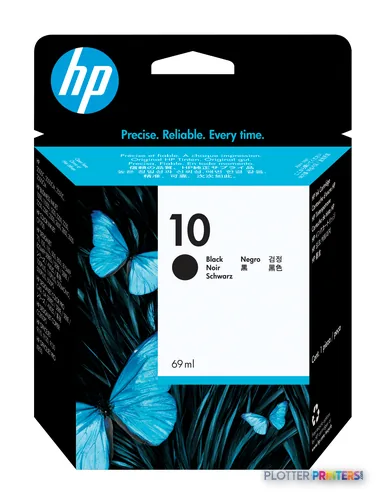
- Runs on HP 10 ink with the HP C4800A, C4801A, C4802A and C4803A supply family.
- No verified print width, speed or duty cycle is available in our grounding — confirm these with HP documentation before buying.
Not sure if the Colorpro CAD is right for you?
Compare key specs and an AI analyst read-out against similar models.
Overview
Built for the work
HP DesignJet Colorpro CAD Printer
Expert analysis
What you should know

Key takeaways
- Built for occasional in-house color CAD prints, not high-volume bid or permit sets.
- Runs on HP 10 ink with the HP C4800A, C4801A, C4802A and C4803A supply family.
- No verified print width, speed or duty cycle is available in our grounding — confirm these with HP documentation before buying.
- Best suited to a small studio or solo engineer who needs color as the exception, not the rule.
- For production plan-set output, a dual-roll production plotter is the correct class instead.
- Verify parts and consumable availability given the machine's age before committing to a purchase or a warranty extension.
Somebody in a small design office needs a check print of a color-coded floor plan before the client walks in. Not a bid set. Not a hundred D-size sheets. One clean sheet, in color, without a trip to the repro shop. That’s the job the HP Designjet Colorpro CAD was built to do.
This is an older HP CAD-oriented DesignJet. I’ll be straight with you: I don’t have a verified spec sheet for it in front of me — no confirmed print width, speed, or duty cycle I’d stake my name on. So I’ll tell you what I can ground, flag what I can’t, and keep the guesswork out of it.
What it is, honestly
The Colorpro CAD name tells you the intent: color output aimed at CAD and technical drawing work, not photo galleries or trade-show boards. It runs on HP 10 ink alongside the HP C4800A, HP C4801A, HP C4802A and HP C4803A supplies — a multi-cartridge setup that gives you color plots without a separate large-format device or an outside vendor.
Beyond the consumable family, I won’t invent numbers. If a dealer quotes you a print width or a plot speed, get it in writing against HP’s own documentation before you sign anything. An unverified spec is how a print room ends up with a machine that doesn’t fit the paper it runs all day.
Where it fits — and where it doesn't
This machine earns its keep in a low-volume corner of the workflow. Think a small architecture studio or a solo civil engineer who needs occasional color — a marked-up utility plan, a coordination drawing, a client-facing rendering print now and then. When color is the exception rather than the rule, having it in-house beats driving to a repro house.
Where it doesn’t fit: high-volume bid-set and permit-set production. If you’re printing multi-page D-size sets against a 4:45 p.m. courier pickup, you want a modern dual-roll production plotter with automatic roll switching and stacking — the kind of thing the discontinued but still-common HP DesignJet T918 36-in represented in the MFP class. You can line the two up here, but understand you’re comparing a light color device to a production workhorse. Different jobs entirely.
If you’re weighing a replacement, check where this sits in the wider CAD plotter field via the class ranking before committing.
Related machines
The read
The Colorpro CAD is a narrow-purpose tool: occasional in-house color for a small technical shop. If that’s your reality, it does a job the courier can’t do faster. But I can’t hand you verified speeds, widths or duty cycles here, and for a purchase decision that matters. Get HP’s current documentation, confirm parts and ink availability for a machine of this age, and price out consumables over a realistic year before you buy. Bottom line: right idea for light color work, but buy it with your eyes open on the spec sheet and the support runway.
Spec analysis
How the specs grade
Overall performance
—Not enough data for an overall score
Individual dimensions are shown where the specs support them.
Specifications
Full technical detail
Use caseCAD / Technical
Everything that fits the HP DesignJet Colorpro CAD
The full supplies hub lists every cartridge, printhead, roll and accessory verified against the manufacturer's own documentation for this machine.
1 ink cartridge · 12 paper & media items · 2 coverage plans
HP DesignJet Colorpro CAD ink and paper →Supplies
Compatible ink, printheads & media
Genuine consumables that fit the HP DesignJet Colorpro CAD Printer — only the cartridges, printheads and media compatible with this model.
Ink Cartridges 1
Paper & Media 12
 Representative image11 Mil Water-Resistant Synthetic BannerRepresentative image180gsm Solvent Satin PE PaperRepresentative image5 Mil Polycarbonate LaminateRepresentative image3 Mil Fusion Finesse Polypropylene LaminateRepresentative image230gsm Special Matte Photo PaperRepresentative image200gsm Special Matte Photo PaperRepresentative image10 Mil Water-resistant Blockout Display FilmRepresentative image10 Mil White Opaque BackerRepresentative image8mil Poster Paper Satin (514)Representative image20LB Engineering Vellum (471)Representative imageWSL 28LB Simple Inkjet Coated Matte Paper (C2S) (448)Representative imageWSL 24LB Simple Inkjet Coated Matte Paper (C2S) (446)

Questions
Straight answers
What ink does the HP Designjet Colorpro CAD use?
It uses HP 10 ink along with the HP C4800A, HP C4801A, HP C4802A and HP C4803A supplies. Confirm current stock and pricing before you buy, since supply availability matters on older machines.
Is this a good machine for printing full bid sets or permit sets?
No. It’s a low-volume color device, not a production plotter. For multi-page D-size set production against deadlines, you want a modern dual-roll machine with automatic roll switching and stacking.
How does it compare to the HP DesignJet T918 36-in?
They’re built for different jobs. The T918 (now discontinued but common in the installed base) is a scanner/MFP production-class machine; the Colorpro CAD is a lighter color device. You can compare them side by side, but expect very different throughput and workflow roles.
Can I get warranty coverage on this machine?
Several HP warranty and support-extension options exist in our catalog, including next-business-day and multi-year support packs. Given the machine’s age, confirm exactly which coverage still applies to your unit before purchasing an extension.
What's its print width and speed?
I don’t have a verified figure to give you. Our grounding doesn’t include a confirmed width, speed or duty cycle, so ask your dealer for HP’s own documentation and get any quoted number in writing before you commit.
Ready to put the HP DesignJet Colorpro CAD to work?
Configuration, media and a quote tailored to your workflow — from AEC plotter specialists.