
Home / Wide-Format Printers / Canon imagePROGRAF
Canon · Wide-Format Plotter
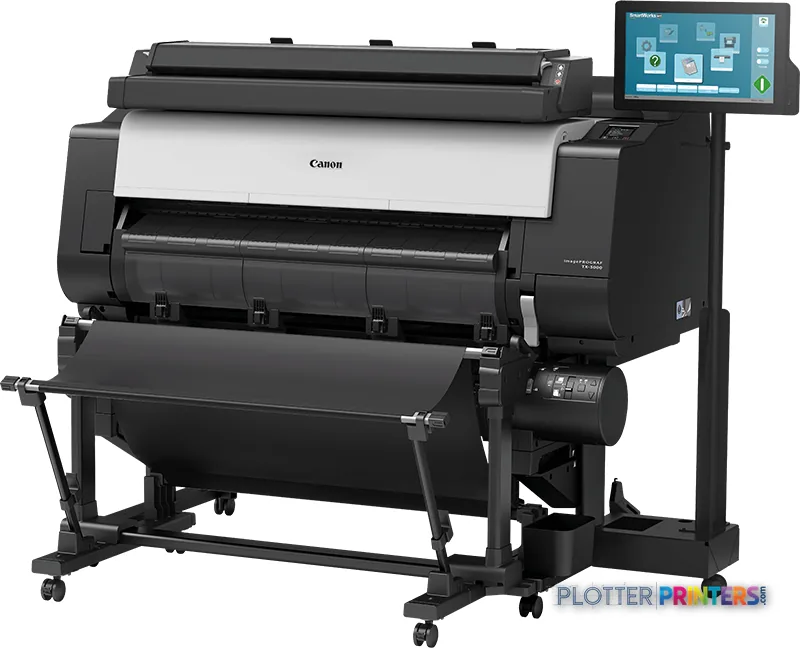
Canon imagePROGRAF TX-3000 MFP T36
44" wide-format MFPs
- ModelTX-3000 MFP T36
- Prints44" wide
Genuine OEM hardwareAuthorized U.S. distribution
Manufacturer warrantyExtension plans available
Free shippingContinental U.S.
Plotter specialistsAEC experts, not just sellers
Analyst take
- The Canon TX-3000 MFP T36 combines color inkjet printing, color scanning and a stacker for shared AEC document-production work.
- Its 44 in maximum roll width, A0 maximum print size and cut-sheet support fit a broad range of plan, map and technical-graphics output.
- The 0.1% accuracy specification and 2400 x 1200 DPI maximum resolution are relevant to detailed drawing reproduction.
Not sure if the TX-3000 MFP T36 is right for you?
Compare key specs and an AI analyst read-out against similar models.
- Wide-format reach Prints up to 44" wide on rolls and sheets.
- Fine detail 2400 x 1200 DPI maximum resolution for crisp line work.
- Ink platform Cyan, Magenta, Matte black, Yellow.
- Scan & copy Integrated scanner for digitizing and sharing sets.
- Connectivity Ethernet for shared team printing.
- Verified specs 10 specs checked against the manufacturer datasheet.
Overview
Built for the work
Canon imagePROGRAF TX-3000 MFP T36, Inkjet, 2400 x 1200 DPI, Cyan, Magenta, Matte black, Yellow, PF-06, Color scanning, 1200 x 1200 DPI
Expert analysis
What you should know

Key takeaways
- The Canon TX-3000 MFP T36 combines color inkjet printing, color scanning and a stacker for shared AEC document-production work.
- Its 44 in maximum roll width, A0 maximum print size and cut-sheet support fit a broad range of plan, map and technical-graphics output.
- The 0.1% accuracy specification and 2400 x 1200 DPI maximum resolution are relevant to detailed drawing reproduction.
- Color scanning is useful when field markups, coordination drawings and survey annotations carry meaning beyond black lines.
- IT teams should validate endpoint support, driver deployment, scan-file handling and network controls before rollout.
- The decision between Canon TX family models should begin with actual sheet widths and scan needs, not a nominal model tier.
AEC printing rarely fails because a drawing cannot be printed. It fails because a permit set arrives late, a field redline must become a usable PDF, or the person at the device has to stop and sort out media, files and scan destinations. The Canon TX-3000 MFP T36 is a color inkjet multifunction system for teams that need wide-format output alongside color scanning and direct printing in one work area.
Its 44 in maximum roll width, support for cut sheets and rolls, and A0 maximum print size make it relevant to plan sets, coordination drawings, GIS maps, marked-up sheets and presentation-oriented technical graphics. The 0.1% accuracy specification and 2400 x 1200 DPI maximum resolution deserve attention where fine linework and small annotation must remain intelligible. Resolution is not a substitute for a disciplined PDF workflow, but it is a sound starting point.
44" (111.8 cm)Maximum roll widthFor wide-format AEC output.
2400 x 1200 DPIMaximum resolutionFor detailed linework and color graphics.
1200 x 1200 DPIOptical scanning resolutionColor scanning is included.
128 GBInternal storage capacitySSD-based internal storage.
Where it fits in an AEC document system
This machine is particularly well suited to an architecture, engineering or construction office that still produces physical drawing sets but also needs to convert marked-up plans into digital project records. Color scanning matters for redlines, utility markups, phasing plans and coordination sheets where a monochrome copy loses useful information. Direct printing, Ethernet LAN and USB connectivity give print-room staff and project teams more than one route into the device.
- Permit, bid and construction drawing output up to A0 size
- Color scanning of field markups and legacy drawings
- GIS, survey and coordination drawings that depend on color cues
- Mixed roll and cut-sheet work in a shared document-production area
The included TX-Series Printer Driver, Quick Utility Toolbox, Print Plug-in for Office, Extended Survey Program and Poster Artist Lite cover basic submission and utility needs. Firms with standardized PDF workflows should still test their actual CAD exports, Revit PDFs and Bluebeam-marked files. A plotter that saves thirty seconds a plot buys you nothing if the file spends four minutes finding it.
Output, media and scan considerations
The TX-3000 MFP T36 uses five cartridges—cyan, magenta, matte black and yellow are listed among its printing colors—and a PF-06 print head. It supports borderless printing and media up to 0.0315 in thick. Those are useful capabilities for technical graphics and selected presentation work, though the buyer should validate the exact bond, coated stock and drawing-file mix used by the office.
The built-in stacker is meaningful in a real plan-room workflow because it helps keep output organized after a run. It does not remove the need to confirm set order, sheet orientation and revision status before a deadline. The scanner is free. The person standing at it is not.
For security and IT, the documented network protocols include SNMP, HTTP, TCP/IP for IPv4 and IPv6, and ftp. That provides a basis for network visibility and integration, but IT should establish the required authentication, access-control and scan-file handling process before deployment. The supplied operating-system list includes Windows 10, Windows 7, Windows 8.1 and several older Mac OS X releases; confirm current endpoint support and driver policy in your own environment.
How to position it within the Canon TX family
The first decision is width. A team whose work is genuinely centered on smaller sheets should examine the Canon TX-2100 24-in rather than carry a wider device into a cramped office. Conversely, organizations that routinely need broader output should consider the Canon TX-4000 44-in. The comparison is about the drawings your teams actually issue, not the occasional oversized exhibit.
Within the 36-in class, the Canon TX-3100 36-in and Canon TX-3200 36-in are the appropriate family conversations. Evaluate them against this configuration using live sample files, the required scan workflow and the local service arrangement. Compare the TX-3000 MFP T36 and Canon TX-3100 36-in side by side before treating a model number as a workflow conclusion. Money is minutes: include driver support, operator touch time and reprint risk in the evaluation.
Continue the evaluation
The read
Choose the Canon TX-3000 MFP T36 if your AEC office needs color wide-format printing and color scanning in the same document-production workflow, with output up to A0 and a maximum roll width of 44 in. Choose the Canon TX-2100 24-in if smaller-format work dominates, or investigate the Canon TX-4000 44-in if wider output is a regular operational requirement. Buy the machine for the workflow you have, not the one the brochure imagines.
Verified specifications
The specs that decide it
| Maximum print width | 36 in |
|---|---|
| Maximum resolution | 2400 x 1200 dpi |
| Droplet size | 5 picolitremanufacturer-verified |
| Print technology | Canon Bubblejet on Demand, 6 colours (MBK/BK/C/M/Y) |
| Maximum roll width | 36.1 in (917 mm) |
| Internal memory | 128 GB |
| Internal storage | 500 GB |
| Page description languages | HP-GL/2, HP RTL, PDF, JPEGmanufacturer-verified |
| Network / connectivity | Gigabit Ethernet (10/100/1000base-T), Hi-Speed USB, Wi-Fi 802.11b/g/n |
| Weight | 231.5 lb (105 kg) |
manufacturer-verified = checked against the manufacturer’s official datasheet, not aggregator data. Everything else is standards-body / catalog data we consider reliable.
Specifications
Full technical detail
Print technologyInkjet
Max resolution2400 x 1200 DPI
Max print width44"
ColorColor
ConnectivityEthernet (Gigabit LAN), USB
Use caseCAD / Technical
Printing
| Color | Yes |
|---|---|
| Print head | PF-06 |
| Printing colors | Cyan, Magenta, Matte black, Yellow |
| Print technology | Inkjet |
| Maximum resolution | 2400 x 1200 DPI |
| Borderless printing | Yes |
| Number of print cartridges | 5 |
Performance
| Control type | Touch |
|---|---|
| Certification | Energy Star (WW), TUV, CB |
| Color display | Yes |
| Product color | Black |
| Storage media | SSD |
| Internal memory | 2000 MB |
| Built-in display | Yes |
| Display diagonal | 15.6" |
| Built-in processor | Yes |
| Internal storage capacity | 128 GB |
| Sound power level (standby) | 35 dB |
| Sound pressure level (printing) | 51 dB |
Paper handling
| Stacker | Yes |
|---|---|
| Cut sheets | Yes |
| Media thickness | 0.031" (0.8 mm) |
| Maximum print size | A0 (33" x 47" (841 x 1189 mm)) |
| Maximum roll width | 44" (111.8 cm) |
| Maximum roll length | 708.7" (18 m) |
| Maximum roll diameter | 6.69" (17 cm) |
| Paper tray media types | Plain paper, Roll |
| ISO A-series sizes (A0…A9) | A0, A1, A2, A3, A3+ |
| ISO B-series sizes (B0…B9) | B0, B1, B2, B4 |
| Borderless printing media sizes | A0, A1, A2, A3, A3+, B4 |
Ports & interfaces
| USB port | Yes |
|---|---|
| Ethernet LAN | Yes |
| USB connector | USB Type-B |
| Direct printing | Yes |
| Supported network protocols | SNMP (Canon-MIB, HTTP, TCP / IP (IPv4 / IPv6), ftp |
Weight & dimensions
| Depth | 12.8" (324 mm) |
|---|---|
| Width | 43.7" (1109 mm) |
| Height | 6.02" (153 mm) |
| Weight | 33.1 lbs (15 kg) |
Power
| AC input voltage | 100-240 V |
|---|---|
| AC input frequency | 50 – 60 Hz |
| Power consumption (standby) | 3.6 W |
| Power consumption (typical) | 105 W |
Operational conditions
| Operating temperature (T-T) | 15 – 30 °C |
|---|---|
| Operating relative humidity (H-H) | 10 – 80% |
Scanning
| Accuracy | 0.1% |
|---|---|
| Scanning | Color scanning |
| Maximum media thickness | 0.0315" (0.8 mm) |
| Optical scanning resolution | 1200 x 1200 DPI |
Packaging data
| Bundled software | imagePROGRAF TX-Series Printer Driver, Quick Utility Toolbox, Print Plug-in for Office, Extended Survey Program and Poster Artist Lite other software is available to download from Canon’s web site. |
|---|
System requirements
| Mac operating systems supported | Mac OS X 10.0 Cheetah, Mac OS X 10.11 El Capitan, Mac OS X 10.12 Sierra, Mac OS X 10.5 Leopard |
|---|---|
| Windows operating systems supported | Windows 10, Windows 7, Windows 8.1 |
Supplies
Compatible ink, printheads & media
Genuine consumables that fit the Canon imagePROGRAF TX-3000 MFP T36 large format printer Inkjet Colour 2400 x 1200 DPI A0 (841 x 1189 mm) Ethernet LAN — only the cartridges, printheads and media compatible with this model.
Paper & Media 12
 Representative imageMagic 98gsm/26# Coated Matte Paper (DMPG98)Representative image28LB Inkjet Coated Matte Paper (748)Representative image46LB Inkjet Coated Matte Paper (747)Representative image6.5mil Matte Coated Paper w/ PSA (746PSA)Representative image24LB Inkjet Coated Matte Paper (745)Representative image20LB High Brite Inkjet Bond Paper (740)Representative image24LB Inkjet Bond Paper (731)Representative image20LB Inkjet Bond Paper (730)Representative image24LB Inkjet Coated Matte Paper Economy (714)Representative image20LB Engineering Vellum (471)Representative imageWSL 28LB Simple Inkjet Coated Matte Paper (C2S) (448)Representative imageWSL 24LB Simple Inkjet Coated Matte Paper (C2S) (446)
Accessories 1
Questions
Straight answers
What AEC work is the Canon TX-3000 MFP T36 suited to?
It fits plan output, permit and bid drawings, color-coded coordination sheets, GIS and survey graphics, and scanning of marked-up drawings. It supports rolls and cut sheets, with A0 as its stated maximum print size.
Can it scan color redlines and marked-up plans?
Yes. The product data lists color scanning with 1200 x 1200 DPI optical scanning resolution. Teams should still define where scans are named, stored and shared in the project workflow.
What media sizes and types can it handle?
The stated maximum roll width is 44 in, and supported tray media types are plain paper and roll. It supports cut sheets, rolls and media up to 0.0315 in thick.
What connectivity and network support does it provide?
It has Ethernet LAN, a USB port and a USB Type-B connector. Documented network protocols include SNMP, HTTP, TCP/IP for IPv4 and IPv6, and ftp.
Which Canon TX alternatives should a buyer consider?
Consider the Canon TX-2100 24-in where smaller-width output is the norm, and the Canon TX-4000 44-in where wider output is regularly required. The Canon TX-3100 36-in and Canon TX-3200 36-in are also relevant same-width family comparisons.
What consumables should operations staff plan around?
The product data identifies five print cartridges and a PF-06 print head. Compatible listed supplies include Canon PFI-110BK ink cartridge Original Black, Canon PFI-110C ink cartridge Original Cyan, Canon PFI-110M ink cartridge Original Magenta, Canon PFI-110Y ink cartridge Original Yellow, Canon PFI-310BK ink cartridge Original Black, Canon PFI-310C ink cartridge Original Cyan, Canon PFI-310M ink cartridge Original Magenta, Canon PFI-310Y ink cartridge Original Yellow, Canon PFI-710BK ink cartridge Original Black and Canon CT-07.
Ready to put the Canon imagePROGRAF TX-3000 MFP T36 to work?
We’ll point you to the current equivalent and quote it for your workflow.