
Home / Wide-Format Printers / Epson SureColor
Epson · Wide-Format Plotter
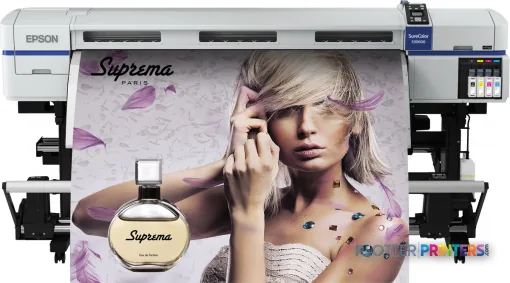
Epson SureColor SC-S30610
technical / CAD plotter
- ModelSC-S30610
- Score50/100
Authorized Epson dealerGenuine hardware & ink
Manufacturer warrantyExtension plans available
Free shippingContinental U.S.
Plotter specialistsAEC experts, not just sellers
Analyst take
- The Epson SC-S30610 is a 64-inch color inkjet printer for wide-format output rather than scanning and copying.
- Ethernet LAN and USB support a wired, managed print workflow; Wi-Fi is not available.
- It has no scanner or copying capability, so redline capture and document conversion require another workflow.
Not sure if the SC-S30610 is right for you?
Compare key specs and an AI analyst read-out against similar models.
- Fine detail 720 x 1440 DPI maximum resolution for crisp line work.
- Ink platform Black, Cyan, Magenta, Yellow.
- Connectivity Ethernet for shared team printing.
- Analyst score Scores 50/100 in our class-relative rating.
Overview
Built for the work
Epson SureColor SC-S30610, Inkjet, 720 x 1440 DPI, Black, Cyan, Magenta, Yellow, MicroPiezo TFP print head, 0.0394" (1 mm), 0.1 – 1 mm
Spec Analysis
overall
overall
Expert analysis
What you should know

Key takeaways
- The Epson SC-S30610 is a 64-inch color inkjet printer for wide-format output rather than scanning and copying.
- Ethernet LAN and USB support a wired, managed print workflow; Wi-Fi is not available.
- It has no scanner or copying capability, so redline capture and document conversion require another workflow.
- The 103.1-inch width and 482.8-pound weight require a planned print-room location, not an improvised office corner.
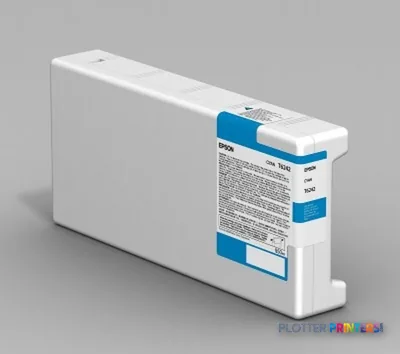
- Epson UltraChrome GS2 inks and the Epson Waste ink bottle are the relevant consumable families for routine operation.
It is 4:45 p.m., the permit set has changed again, and somebody needs a color plan on ordinary media before the superintendent leaves. The Epson SC-S30610 is a 64-inch inkjet printer for firms that need wide, color technical output but do not need scanning, copying, or a multifunction device parked in the print room.
Its job is output. Send the file over Ethernet or USB, load the right media, and produce color drawings, maps, coordination sheets, signage, and presentation work. That sounds simple because it is simple. The trade-off is that the surrounding workflow has to do more of the work.
64"FormatA wide format for oversized color output.
720 x 1440 DPIMaximum resolutionRelevant when fine graphical detail matters.
0.004"–0.039" (0.1 – 1 mm)Media thicknessCheck every specialty substrate against this range.
482.8 lbs (219 kg)Printer weightPlan the location and installation route before delivery day.
Where it fits in an AEC print room
This machine makes sense when the work is primarily color output: site logistics plans, GIS mapping, color-coded MEP coordination sheets, renderings, construction graphics, and presentation boards. Its four printing colors—black, cyan, magenta, and yellow—keep the system focused on standard color production rather than an expanded-ink workflow.
The MicroPiezo TFP print head and stated maximum resolution of 720 x 1440 DPI point to a printer that should be evaluated on the actual files your team sends. Bring a dense civil base map. Bring a Revit sheet with small room tags. Bring a PDF with screened fills and redlines. A pretty test image is not a bid set, however much the sales demo wants it to be.
There is one Ethernet LAN connection and one USB 2.0 port. There is no Wi-Fi. That can be a sensible fit for an IT-managed print location, where a wired connection is preferred and users submit through an established workstation or print workflow. It is less handy for an ad hoc office setup.
Bottom line: This is for teams producing wide color output from controlled files, not for teams needing a walk-up document center.
The operational limits matter more than the brochure language
The SC-S30610 has no scanner and no copying function. That is the first failure mode to name. If field crews bring marked-up plans back to the office and expect same-device scan, copy, and reprint, this is not the right machine by itself. You will need a separate scanning path.
Its footprint is substantial: 103.1 inches wide, 49.6 inches deep, and 51.6 inches high. At 482.8 pounds, this is not something to tuck beside a project manager’s desk after lunch. Allow room for media handling, access, and the person who has to clear an issue when the deadline is already breathing down their neck.
The LCD display is built in and measures 2.48 inches diagonally. Fine for machine status and basic control; do not mistake it for a full job-management workstation. The printer uses Epson UltraChrome GS2 inks and an Epson Waste ink bottle. Consumables planning belongs in the operating routine, especially where color output is tied to construction milestones rather than occasional presentation work.
Bottom line: The physical space, media routine, and separate scan workflow need to be settled before this printer earns its floor space.
How to compare it without comparing apples to scaffolding
There is no listed in-family step-up or step-down model in the available catalog data. So the sensible comparison is functional, not a made-up model-number ladder. If you need a narrower 36-inch device, review the Canon GP-300 36-in or Canon imagePROGRAF 700 36-in. Both are catalog-listed 36-inch alternatives, which may suit offices where standard plan widths matter more than a 64-inch format.
If copying and scanning are part of the daily job, the Canon iPF770 36-in is catalog-listed with scanner/MFP capability. That is a different workflow proposition. It may reduce handoffs for redlines and archival conversion, but it is also a 36-inch machine rather than a 64-inch format device.
Use the comparison tool for the SC-S30610 and Canon iPF770 36-in to separate output width from multifunction requirements. Those are two different buying decisions that often get mashed together at the end of a lease. That is how print rooms acquire furniture with power cords.
Bottom line: Choose this Epson when wide color output is the job; choose a multifunction alternative when scan-and-copy traffic is the job.
Useful next checks
The read
The Epson SC-S30610 is a straightforward fit for an AEC team that needs wide, wired-network color output and already has scanning covered elsewhere. It has Ethernet, USB, a 64-inch format, and support for media up to 0.039 inches thick. It does not have Wi-Fi, copying, or scanning. Those omissions are not defects if they match the workflow. They are expensive annoyances if they do not. Verify the media you use, test the smallest text your drawings contain, confirm the installation space, and make the service plan answerable at 4:45 p.m. Bottom line: Buy it for wide color production, not as a substitute for a technical multifunction system.
Spec analysis
How the specs grade
Overall performance
within technical / CAD plotters
52% spec coverage
- This printer
Verified specifications
The specs that decide it
| Print technology | Inkjet |
|---|---|
| Maximum resolution | 720 x 1440 DPI |
| Printing colors | Black, Cyan, Magenta, Yellow |
| Number of print cartridges | 4 |
| Internal memory | 512 MB |
| Media thickness | 0.1 – 1 mm |
| Scanning | No |
| Wi-Fi | No |
| Ethernet | Wired networkingmanufacturer-verified |
| Sound level (printing) | 59 dB |
| Power consumption | 650 W |
manufacturer-verified = checked against the manufacturer’s official datasheet, not aggregator data. Everything else is standards-body / catalog data we consider reliable.
Specifications
Full technical detail
Print technologyInkjet
Max resolution720 x 1440 DPI
ColorColor
ConnectivityEthernet (Gigabit LAN), USB
Use caseGraphics / Production
Printing
| Color | Yes |
|---|---|
| Print head | MicroPiezo TFP print head |
| Printing colors | Black, Cyan, Magenta, Yellow |
| Print technology | Inkjet |
| Maximum resolution | 720 x 1440 DPI |
| Number of print cartridges | 4 |
Performance
| Display | LCD |
|---|---|
| Product color | White |
| Internal memory | 512 MB |
| Built-in display | Yes |
| Display diagonal | 2.48" |
| Country of origin | China |
| Sound pressure level (printing) | 59 dB |
Paper handling
| Media thickness | 0.1 – 1 mm |
|---|---|
| Roll top margin | 0.197" (5 mm) |
Ports & interfaces
| Wi-Fi | No |
|---|---|
| USB port | Yes |
| Ethernet LAN | Yes |
| USB connector | USB Type-B |
| RJ-45 ports quantity | 1 |
| USB 2.0 ports quantity | 1 |
Weight & dimensions
| Depth | 49.6" (1259 mm) |
|---|---|
| Width | 103.1" (2620 mm) |
| Height | 51.6" (1311 mm) |
| Weight | 482.8 lbs (219 kg) |
| Size (imperial) | 64" |
Power
| Power consumption (off) | 0.6 W |
|---|---|
| Power consumption (standby) | 30 W |
| Power consumption (typical) | 650 W |
| Power consumption (PowerSave) | 520 W |
Other features
| Noise level (ready) | 7.4 dB |
|---|---|
| Number of power supply units | 1 |
Copying
| Copying | No |
|---|
Scanning
| Scanning | No |
|---|---|
| Maximum media thickness | 0.0394" (1 mm) |
Logistics data
| Quantity per pack | 1 pc(s) |
|---|
Packaging data
| Manual | Yes |
|---|---|
| Package depth | 124.6" (3165 mm) |
| Package width | 43.3" (1100 mm) |
| Package height | 61.4" (1560 mm) |
| Package weight | 832.7 lbs (377.7 kg) |
| Drivers included | Yes |
| Quick start guide | Yes |
| Cartridge(s) included | Yes |
Sustainability
| Sustainability certificates | ENERGY STAR |
|---|
System requirements
| Mac operating systems supported | Mac OS X 10.4 Tiger |
|---|---|
| Windows operating systems supported | Windows 7, Windows 7 x64, Windows Vista, Windows Vista x64, Windows XP |
Everything that fits the Epson SureColor SC-S30610
The full supplies hub lists every cartridge, printhead, roll and accessory verified against the manufacturer's own documentation for this machine.
4 ink cartridges · 2 accessories
Epson SureColor SC-S30610 ink and paper →Supplies
Compatible ink, printheads & media
Genuine consumables that fit the Epson SureColor SC-S30610 — only the cartridges, printheads and media compatible with this model.
Ink Cartridges 4

Questions
Straight answers
Can the Epson SC-S30610 scan marked-up plans or make copies?
No. The supplied data lists scanning and copying as unavailable. Firms handling frequent redline capture need a separate scanner or a multifunction workflow.
How does the SC-S30610 connect to the network?
It has one Ethernet LAN connection and one USB 2.0 port with a USB Type-B connector. Wi-Fi is not available.
What media can it handle?
The stated media-thickness range is 0.004 to 0.039 inches, or 0.1 to 1 mm. Confirm each media type and finishing requirement before standardizing a workflow.
Is this printer practical for a small office?
That depends on the room. The unit is 103.1 inches wide, 49.6 inches deep, 51.6 inches high, and weighs 482.8 pounds, so access and operating clearance deserve attention.
What consumables should buyers plan around?
The compatible ink family is Epson UltraChrome GS2. The listed maintenance consumable is the Epson Waste ink bottle.
Ready to put the Epson SureColor SC-S30610 to work?
Configuration, media and a quote tailored to your workflow — from AEC plotter specialists.