Expert analysis
What you should know
Key takeaways
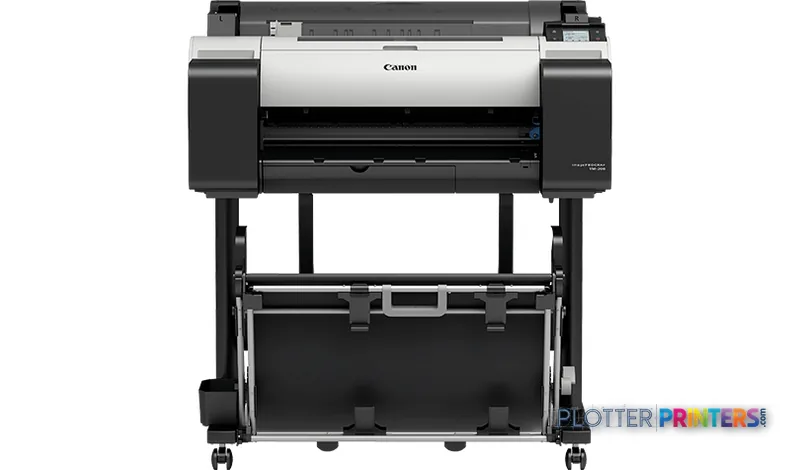
- The Canon TM-205 24-in is a current 24-inch inkjet printer aimed at A1-and-smaller technical and color-document output.
- It supports roll paper and cut sheets, with media thickness specified from 0.003"–0.031" (0.07 – 0.8 mm).
- HP-GL/2, HP-RTL, and PDF support makes it relevant to established CAD and PDF-based AEC workflows.
- It has no scanning or copying function, which is a meaningful limitation for redline-capture and legacy-document workflows.
- Teams that routinely require 36-inch construction or engineering sheets should evaluate a wider in-family model rather than stretch a 24-inch workflow.
At a permit-set deadline, the useful plotter is the one that turns a dense PDF into a legible drawing without taking over the studio. The Canon TM-205 24-in is a current 24-inch inkjet machine for teams whose everyday output is A1 and smaller: plan excerpts, detail sheets, schedules, color-coded coordination drawings, GIS maps, and presentation-ready construction documents.
Its value is practical rather than theatrical. HP-GL/2, HP-RTL, and PDF support speaks directly to common CAD and PDF submission habits, while roll and cut-sheet handling accommodates the alternating rhythm of technical drawings and smaller review sheets. At 44 dB while printing, it is specified for a relatively restrained office presence—the sound of a busy office rather than a reprographics room.
A1 (23" x 33" (594 x 841 mm))Maximum print size
2400 x 1200 DPIMaximum resolution
500 GBInternal storage capacity
44 dBSound pressure level (printing)
Where it fits in an AEC workflow
This is a sensible fit for an architecture studio, engineering discipline group, field-office team, or survey department that needs dependable access to 24-inch output close to the people reviewing it. The 2 GB RAM and 500 GB internal storage provide useful headroom for submitted files, while Gigabit Ethernet, Wi-Fi, and USB Type-B offer several deployment paths for office IT.
For drawing work, the 2400 x 1200 DPI specification matters chiefly when fine annotation, hatch patterns, utility linework, and small callouts must remain distinct. Resolution is not a promise of a particular visual result on every paper or file; it is a useful ceiling. The machine accepts rolls and cut sheets, with supported media thickness from 0.003″–0.031″ (0.07 – 0.8 mm), giving teams room to use ordinary technical media as well as heavier presentation-oriented stock within that range.
It also supports a 0.118″ (3 mm) roll top margin and 0.12″ (3 mm) cut-sheet margin. For teams issuing marked-up drawing fragments, that modest edge allowance can be more useful than it sounds: the linework has room to breathe without the pale cyan edge of a clipped boundary.
Choose the workflow, not just the width
The Canon TM-205 24-in is a printer, not a multifunction document station: it has no scanning or copying capability. That is the central limitation for firms that regularly capture redlines, duplicate field sketches, or convert legacy paper drawings. In those environments, the Canon TM-250 24-in is the more relevant in-family alternative because it is listed as a scanner/MFP.
Width is the other decision point. A 24-inch device is appropriate when A1 and smaller sheets dominate, but it is not the natural answer for teams routinely issuing 36-inch civil, structural, or construction sets. Those buyers should examine the Canon TM-300 36-in or compare the two formats directly with the 24-inch versus 36-inch comparison tool. The TM-205’s listed maximum print size is A1, so do not treat it as a substitute for a wider plan-production workflow.
Within the smaller Canon family, the Canon TM-240 24-in is a current alternative to assess when updating the device rather than simply matching a known workflow. The specification overlap at 2400 x 1200 DPI does not settle the decision; local service terms, driver testing with actual PDFs, and the need for scanning should carry more weight.
Questions IT and print-room staff should settle first
Confirm how your users will submit work: direct PDF, HP-GL/2, HP-RTL, or a managed driver queue. Test representative files, especially PDFs with transparency, dense vector layers, embedded raster aerials, and mixed page sizes. The supported page-description languages are well aligned with established AEC file types, but a realistic test remains the cleanest way to identify file-specific behavior.
Also establish who will load media, monitor output, and maintain continuity during a deadline. The TM-205 has one RJ-45 port, Wi-Fi, and USB connectivity, but network connection is not the same thing as an agreed support process. Ask the supplying partner about local response arrangements, replacement-device options, and consumables availability. For context on the broader segment, consult the 24-inch wide-format ranking and how we evaluate office wide-format printers.
Related comparisons and guidance
The read
The Canon TM-205 24-in is well suited to decentralized AEC plotting where A1-and-smaller output, PDF/CAD compatibility, and office-appropriate operation matter more than scanning, copying, or wide-sheet production. It becomes less appropriate when redline capture is routine or 36-inch plans are the daily standard. Treat its 24-inch format as the defining choice, validate it with your real drawing files, and make local service capability part of the decision rather than an afterthought.