
Home / Wide-Format Printers / Canon imagePROGRAF
Canon · Wide-Format Plotter
Canon imagePROGRAF iPF6300
36" wide-format inkjet printer
- ModeliPF6300
- Prints36" wide
Genuine OEM hardwareAuthorized U.S. distribution
Manufacturer warrantyExtension plans available
Free shippingContinental U.S.
Plotter specialistsAEC experts, not just sellers
Analyst take
- The iPF6300 is a 24-inch color printer suited to detailed AEC drawings, maps, proofs, and presentation-oriented output.
- Its supported architectural sizes include 24 x 36", making it usable for common full-size plan sheets.
- The listed 44 sqf/h best-quality speed should be treated as a quality-mode measure, not mixed-set production throughput.
Not sure if the iPF6300 is right for you?
Compare key specs and an AI analyst read-out against similar models.
- Wide-format reach Prints up to 36" wide on rolls and sheets.
- Fine detail 2400 x 1200 DPI maximum resolution for crisp line work.
- Connectivity Ethernet for shared team printing.
Overview
Built for the work
Canon imagePROGRAF iPF6300, 2400 x 1200 DPI, 44 sqf/h, A1 (594 x 841 mm), A1, A2, A3, A4, B2, 0.07 – 0.8 mm
Expert analysis
What you should know

Key takeaways
- The iPF6300 is a 24-inch color printer suited to detailed AEC drawings, maps, proofs, and presentation-oriented output.
- Its supported architectural sizes include 24 x 36", making it usable for common full-size plan sheets.
- The listed 44 sqf/h best-quality speed should be treated as a quality-mode measure, not mixed-set production throughput.
- Roll media and support for paper, film, vinyl, and proofing media make it more flexible than a bond-only plan printer.
- Teams with routine wide-format or sustained plan-set work should evaluate a wider device before committing.
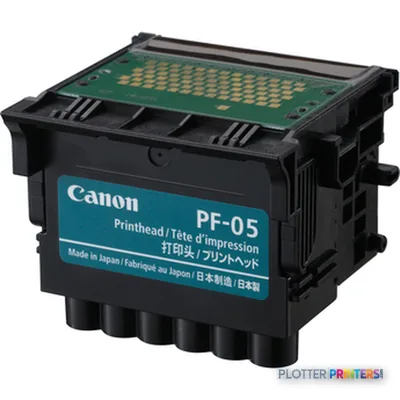
- The Canon PF-05 printhead and Canon ST-25 are the listed compatible consumable and accessory families.
It is 4:45 p.m. The architect needs a clean 24 x 36 plan, the engineer has a color coordination sheet behind it, and nobody wants a media-loading lecture before the courier cutoff. The Canon iPF6300 is a 24-inch color wide-format printer for that desk-side AEC role: drawings, maps, presentation output, and proof-oriented work where detail matters more than brute production volume.
Its listed media support covers roll paper plus coated, glossy, photo, proofing, opaque paper, opaque film, and vinyl media. That gives a small studio or departmental print room room to move between ordinary plan output and visual deliverables without bringing in a second device. Bottom line: this is a detail-focused 24-inch printer, not a plan-room production engine.
33 inPrint widthSupports architectural sizes through 24 x 36".
2400 x 1200 DPIMaximum resolutionUseful when small notes, linework, and color overlays need close inspection.
44 sqf/hBest-quality print speedA quality-mode figure, not a promise for a mixed bid-set deadline.
0.003"–0.031" (0.07 – 0.8 mm)Media thicknessSupports a range of paper and film applications.
Where it earns its floor space
The iPF6300 fits architecture and engineering teams that need color drawings alongside technical output: permit sheets with review marks, GIS maps, color-coded MEP coordination plans, landscape layouts, and presentation boards within its supported media range. The 4 pl ink drop and 2400 x 1200 DPI maximum resolution point toward careful line and image work, especially when a drawing will be reviewed at arm’s length rather than filed and forgotten.
It accepts roll paper and supports standard office sizes through 22 x 34″, plus architectural sizes from 9 x 12″ through 24 x 36″. Gigabit Ethernet and USB 2.0 provide the basic connections expected in a shared office. The LCD helps at the machine when paper or consumables need attention. Bottom line: it makes sense where color communication is part of the drawing, not an occasional afterthought.
The trade-offs show up during a deadline
A 24-inch printer is naturally constrained when the job calls for wider construction graphics or a steady stream of large plan sets. Its listed best-quality speed is 44 sqf/h, which deserves context: a single detailed sheet is one thing; a run involving different sheet sizes, media changes, and hand sorting is another. The printer supports rolls up to 708.7″, but roll capacity does not turn a quality-oriented device into an unattended reprographics line. Paper has a way of choosing 4:45 p.m. for its little dramas.
At 46.3 x 34.3 x 39″ and 145.5 lbs, it needs a deliberate location rather than a spare corner. Listed printing sound pressure is 47 dB, while standby sound power is 35 dB. For teams that need a broader format option, review the Canon iPF840 44-in. For 24-inch Canon alternatives, compare the Canon iPF6400 24-in and Canon iPF6300S 24-in against the actual media and output mix. Bottom line: do not buy a 24-inch machine to solve a wider-format production problem.
Supplies, network fit, and the questions worth asking
The listed ink set includes BK, MBK, C, M, Y, PC, PM, GY, PGY, R, G, and B, with the Canon PF-05 printhead. The Canon ST-25 is the listed accessory. Network support includes HTTP, TCP/IP, IPv4/IPv6, SNMP, and IPX/SPX, with one RJ-45 port. That is useful baseline information for IT, but it does not answer the questions that cause trouble later: driver deployment, authentication policy, accounting requirements, and who owns first-line support.
Before committing, run your own PDFs with fine text, screened fills, and color-coded markups. Confirm the media you actually stock. Ask who handles a failed printhead and what the service path looks like locally. If a wider 36-inch workflow is the real requirement, put it beside the Epson SC-T5100 36-in in the comparison tool rather than assuming width is a minor detail. Bottom line: test the files that create your deadline, not a tidy demo page.
Compare related wide-format options
The read
The Canon iPF6300 is a credible fit for a small AEC team or department that values detailed 24-inch color output across paper and specialty media. It is less appropriate for high-volume, mixed-size plan-set production or work that regularly needs more than 24 inches of width. Choose it for the work it is built to handle, and let a wider or more production-oriented device take the jobs that would otherwise keep somebody in the print room after everyone else has gone home.
Verified specifications
The specs that decide it
| Maximum resolution | 2400 x 1200 DPI |
|---|---|
| Maximum print size | A1 (594 x 841 mm) |
| Media thickness | 0.07 – 0.8 mm |
| Ethernet | Yes |
| Sound level (printing) | 47 dB |
| Power consumption | 100 W |
Specifications
Full technical detail
Max resolution2400 x 1200 DPI
Max print width36"
ConnectivityEthernet (Gigabit LAN), USB
Use caseCAD / Technical
Printing
| Color | Yes |
|---|---|
| Maximum resolution | 2400 x 1200 DPI |
| Print head nozzles | 2560 |
| Print speed (best quality) | 44 sqf/h |
Performance
| Display | LCD |
|---|---|
| Built-in display | Yes |
| Sound power level (standby) | 35 dB |
| Sound pressure level (printing) | 47 dB |
Paper handling
| Roll paper | Yes |
|---|---|
| Media thickness | 0.003"–0.031" (0.07 – 0.8 mm) |
| ANSI paper sizes | 8.5 x 11", 8.5 x 14", 11 x 17", 13 x 19", 17 x 22", 22 x 34" |
| Maximum print size | A1 (23" x 33" (594 x 841 mm)) |
| Architectural sizes | 9 x 12", 12 x 18", 18 x 24", 24 x 36" |
| Maximum roll length | 708.7" (18 m) |
| ISO A-series sizes (A0…A9) | A1, A2, A3, A4 |
| ISO B-series sizes (B0…B9) | B2 |
| ISO C-series sizes (C0…C9) | C2 |
| JIS B-series sizes (B0…B9) | B2, B3, B4 |
Ports & interfaces
| USB port | Yes |
|---|---|
| Ethernet LAN | Yes |
| USB connector | USB Type-A |
| RJ-45 ports quantity | 1 |
| USB 2.0 ports quantity | 1 |
| Ethernet interface type | Gigabit Ethernet |
| Supported network protocols | HTTP, TCP/IP, IPv4/IPv6, SNMP, IPX/SPX |
Weight & dimensions
| Weight | 145.5 lbs (66 kg) |
|---|---|
| Size (imperial) | 24" |
| Dimensions (WxDxH) | 46.3 x 34.3 x 39" (1177 x 870 x 991 mm) |
Power
| Power supply type | AC |
|---|---|
| Power requirements | 100 – 240V |
| Power consumption (standby) | 7 W |
| Power consumption (typical) | 100 W |
| Power consumption (PowerSave) | 1 W |
Operational conditions
| Operating temperature (T-T) | 15 – 30 °C |
|---|---|
| Operating relative humidity (H-H) | 10 – 80% |
Other features
| Ink drop | 4 pl |
|---|---|
| Opaque film | Yes |
| Photo paper | Yes |
| Vinyl media | Yes |
| Coated paper | Yes |
| Glossy paper | Yes |
| Opaque paper | Yes |
| Proofing paper | Yes |
| High resolution paper | Yes |
| Compatible ink types, supplies | BK, MBK, C, M, Y, PC, PM, GY, PGY, R, G, B |
Supplies
Compatible ink, printheads & media
Genuine consumables that fit the Canon imagePROGRAF iPF6300 large format printer Colour 2400 x 1200 DPI A1 (594 x 841 mm) Ethernet LAN — only the cartridges, printheads and media compatible with this model.
Printheads 1
Questions
Straight answers
Can the Canon iPF6300 print 24 x 36 construction drawings?
Yes. Its supported architectural sizes include 24 x 36″, and it supports roll paper.
What AEC work fits this printer best?
It is suited to detailed color drawings, GIS maps, coordination sheets, review-marked plans, proofs, and presentation output within its 24-inch format.
Is the listed 44 sqf/h speed enough for bid-set production?
It is the listed best-quality speed. Actual turnaround for bid sets also depends on file processing, media changes, output handling, and the mix of sheet sizes.
What media can it handle?
The listed media types include roll paper, coated paper, glossy paper, photo paper, proofing paper, opaque paper, opaque film, and vinyl media. Listed media thickness is 0.003″–0.031″ (0.07 – 0.8 mm).
How can it connect to an AEC office network?
It has Gigabit Ethernet with one RJ-45 port, USB 2.0, and support for HTTP, TCP/IP, IPv4/IPv6, SNMP, and IPX/SPX.
What supplies are listed for the iPF6300?
The listed printhead is the Canon PF-05. The listed accessory is the Canon ST-25, and the compatible ink types listed are BK, MBK, C, M, Y, PC, PM, GY, PGY, R, G, and B.
Ready to put the Canon imagePROGRAF iPF6300 to work?
We’ll point you to the current equivalent and quote it for your workflow.