
Home / Wide-Format Printers / Canon imagePROGRAF
Canon · Wide-Format Plotter
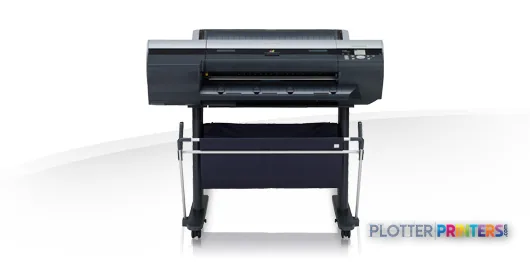
Canon imagePROGRAF iPF6300S
24" color graphics & photo printer
- ModeliPF6300S
- Prints24" wide
Genuine OEM hardwareAuthorized U.S. distribution
Manufacturer warrantyExtension plans available
Free shippingContinental U.S.
Plotter specialistsAEC experts, not just sellers
Analyst take
- The iPF6300S accepts media from 8 to 24 inches wide, but its stated maximum print size is A1, or 23 x 33 inches.
- Its eight printing colors and support for photo, coated, proofing, roll, and cut-sheet media make it relevant to color-oriented AEC documents.
- The available data confirms a 2400 x 1200 DPI maximum resolution but does not provide measured color gamut, line accuracy, or productive throughput.
Not sure if the iPF6300S is right for you?
Compare key specs and an AI analyst read-out against similar models.
- Wide-format reach Prints up to 24" wide on rolls and sheets.
- Fine detail 2400 x 1200 DPI maximum resolution for crisp line work.
- Ink platform Black, Cyan, Gray, Magenta, Pigment cyan, Pigment magenta, Pigment matte black, Yellow.
- Connectivity Ethernet for shared team printing.
Overview
Built for the work
Canon imagePROGRAF iPF6300S, 2400 x 1200 DPI, Black, Cyan, Gray, Magenta, Pigment cyan, Pigment magenta, Pigment matte black, Yellow, PF-05, A1 (594 x 841 mm), A0, A1, B0, B2
Expert analysis
What you should know

Key takeaways
- The iPF6300S accepts media from 8 to 24 inches wide, but its stated maximum print size is A1, or 23 x 33 inches.
- Its eight printing colors and support for photo, coated, proofing, roll, and cut-sheet media make it relevant to color-oriented AEC documents.
- The available data confirms a 2400 x 1200 DPI maximum resolution but does not provide measured color gamut, line accuracy, or productive throughput.
- Gigabit Ethernet, USB Type-A, LCD operation, and 160 GB internal storage support shared-workgroup use.
- The Canon iPF6300 33-in is the logical listed in-family option to examine when 24 x 36-inch drawing workflows are required.
- It is not the natural fit for teams that need integrated scanning, copying, wider boards, or sustained unattended plan-set production.
When a coordination drawing needs a wash of cyan behind disciplined black linework, the eye notices quickly whether the color is merely present or doing useful work. The Canon iPF6300S is a 24-inch color wide-format printer with an eight-cartridge ink set, roll and cut-sheet support, and a 2400 x 1200 DPI maximum resolution. For AEC teams, it is most credible as a compact-format device for presentation-oriented plans, marked-up sheets, GIS exhibits, renderings, and color documentation rather than as a broad-format plan-room engine.
Its maximum stated output is A1, or 23 x 33 inches, despite accepting media widths from 8 to 24 inches. That distinction matters: firms standardizing on 24 x 36-inch ARCH D sheets should confirm their actual sheet and roll workflow before treating this as a conventional construction-document plotter.
8" – 24"Maximum media widthRoll and cut-sheet media are supported.
A1 (23" x 33" (594 x 841 mm))Maximum print sizeA practical limit for drawing-format planning.
2400 x 1200 DPIMaximum resolutionResolution is one part of fine-detail rendering; source PDF and driver handling still matter.
160 GBInternal storage capacityUseful context for a networked print device.
Where it fits in an AEC document workflow
The iPF6300S suits a design studio, engineering team, survey group, or field-support office that needs controlled color on modest-width media. Its supported media range includes photo, coated, proofing, and roll paper, alongside cut sheets. That gives a team latitude to separate everyday exhibits from more presentation-sensitive deliverables without assuming every job needs the same stock.
For CAD and PDF output, the operational question is less about the headline resolution than whether plotted line weights, screened fills, and small annotations remain clear on the paper a team actually uses. The supplied data supports a 2400 x 1200 DPI maximum; it does not provide independent line-accuracy, color-gamut, or throughput measurements. Color-sensitive buyers should therefore test their own Revit sheets, Bluebeam markups, aerial imagery, and branded presentation PDFs—not just a dealer demonstration file.
The built-in LCD, USB Type-A connection, Gigabit Ethernet, and 160 GB internal storage make this a plausible shared-office device. Its listed network protocols include SNMP and TCP/IP for IPv4 and IPv6, which are relevant to IT monitoring and managed-network deployment. They do not, by themselves, establish a particular authentication or secure-release workflow; those requirements should be validated during evaluation.
Capacity, media, and the practical limits
The printer accepts rolls up to 708.7 inches long, with a maximum roll diameter of 5.91 inches, and media thickness from 0.003 to 0.059 inches. Those limits are useful for planning ordinary bond, coated sheets, and heavier presentation media, but they are not a substitute for validating a particular stock. A stiff board, a heavily saturated map, and a standard bond drawing ask very different things of a paper path.
At 46.4 x 34.3 x 39.1 inches and 145.9 lbs, the iPF6300S needs a deliberate home rather than a spare corner beside a project manager’s desk. The stated 47 dB printing sound-pressure level and 100 W typical power consumption point to office-aware deployment, while the operating range of 15 – 30 °C and 10 – 80% relative humidity should be considered in field offices and print rooms with uneven environmental control.
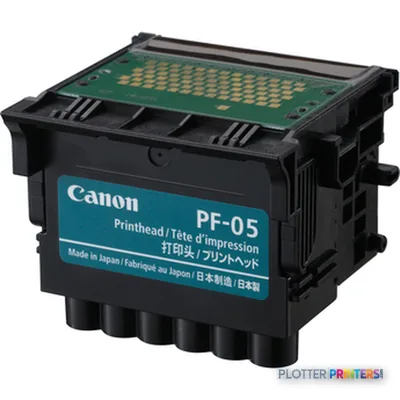
The consumable named for this model is the Canon PF-05 printhead. Keep that part of the continuity discussion when assessing an existing fleet: a replacement decision should cover support arrangements, media profiles, network setup, and the ability to reproduce established drawing and presentation output—not merely the printer itself.
How it sits within the Canon family
The iPF6300S is the narrower choice when A1 output is the true ceiling. Teams needing a wider Canon option should examine the Canon iPF6300 33-in, whose stated 33-inch width changes the conversation for 24 x 36-inch drawing workflows. Conversely, the Canon iPF6350 24-in is the nearer same-width family alternative to investigate when comparing a 24-inch Canon deployment.
Neither comparison should be reduced to resolution alone: all three listed models carry a 2400 x 1200 DPI specification. Ask for samples of the same plan set and media, inspect fine dimensions and gray screens under normal office light, and compare the interruption points around the job. Our comparison tool is a useful way to frame that discussion before a hands-on test.
This machine is less appropriate where the core requirement is routine 24 x 36-inch construction sets, high-volume unattended production, scanning and copying, or wider presentation boards. In those cases, width, finishing, and document-handling workflow deserve priority over a compact 24-inch format.
Related evaluation tools
Canon iPF6300 33-inConsider the wider in-family alternative for drawing formats beyond A1.Canon iPF6350 24-inReview the closest listed 24-inch Canon family alternative.Wide-format class rankingPlace the device in its broader class context.How we evaluate wide-format outputUnderstand the operational criteria behind our coverage.
The read
The Canon iPF6300S is a considered fit for AEC teams whose work lives comfortably within A1 and benefits from color-capable output on a range of roll and sheet media. It becomes more compelling for design communication, mapping, and presentation documents than for a construction office built around 24 x 36-inch plan sets. Treat its 24-inch media capability and A1 maximum output as the first qualification check; if the format fits, validate your actual PDFs, papers, and network workflow before committing.
Verified specifications
The specs that decide it
| Maximum resolution | 2400 x 1200 DPI |
|---|---|
| Printing colors | Black, Cyan, Gray, Magenta, Pigment cyan, Pigment magenta, Pigment matte black, Yellow |
| Number of print cartridges | 8 |
| Maximum print size | A1 (594 x 841 mm) |
| Media thickness | 0.07 – 1.5 mm |
| Maximum roll diameter | 5.91" (15 cm) |
| Ethernet | Yes |
| Sound level (printing) | 47 dB |
| Power consumption | 100 W |
Specifications
Full technical detail
Max resolution2400 x 1200 DPI
Max print width24"
ColorColor
ConnectivityEthernet (Gigabit LAN), USB
Use caseCAD / Technical
Printing
| Color | Yes |
|---|---|
| Print head | PF-05 |
| Printing colors | Black, Cyan, Gray, Magenta, Pigment cyan, Pigment magenta, Pigment matte black, Yellow |
| Maximum resolution | 2400 x 1200 DPI |
| Number of print cartridges | 8 |
Performance
| Display | LCD |
|---|---|
| Certification | UL, FCC B |
| Storage media | HDD |
| Built-in display | Yes |
| Drive device, buffer size | 384 MB |
| Internal storage capacity | 160 GB |
| Sound pressure level (printing) | 47 dB |
Paper handling
| Cut sheets | Yes |
|---|---|
| Roll paper | Yes |
| Media thickness | 0.003"–0.059" (0.07 – 1.5 mm) |
| Maximum print size | A1 (23" x 33" (594 x 841 mm)) |
| Maximum media width | 8" – 24" |
| Maximum roll length | 708.7" (18 m) |
| Maximum roll diameter | 5.91" (15 cm) |
| ISO A-series sizes (A0…A9) | A0, A1 |
| ISO B-series sizes (B0…B9) | B0, B2 |
Ports & interfaces
| USB port | Yes |
|---|---|
| Ethernet LAN | Yes |
| USB connector | USB Type-A |
| USB 2.0 ports quantity | 1 |
| Ethernet LAN data rates | 10/100/1000Base-T/TX |
| Ethernet interface type | Gigabit Ethernet |
| Supported network protocols | IPX/SPX, SNMP HTTP, TCP/IP (IPv4/IPv6), AppleTalk |
Weight & dimensions
| Weight | 145.9 lbs (66.2 kg) |
|---|---|
| Dimensions (WxDxH) | 46.4 x 34.3 x 39.1" (1179 x 871.2 x 993.1 mm) |
Power
| Power requirements | AC 100 – 240V, 50/60Hz |
|---|---|
| Power consumption (off) | 1 W |
| Power consumption (standby) | 6 W |
| Power consumption (typical) | 100 W |
Operational conditions
| Operating temperature (T-T) | 15 – 30 °C |
|---|---|
| Operating relative humidity (H-H) | 10 – 80% |
Other features
| Photo paper | Yes |
|---|---|
| Coated paper | Yes |
| Proofing paper | Yes |
| Maximum media length (imperial) | 59" |
Packaging data
| Drivers included | Yes |
|---|
Sustainability
| Sustainability certificates | ENERGY STAR |
|---|
System requirements
| Mac compatibility | Yes |
|---|
Supplies
Compatible ink, printheads & media
Genuine consumables that fit the Canon imagePROGRAF iPF6300S large format printer Colour 2400 x 1200 DPI A1 (594 x 841 mm) Ethernet LAN — only the cartridges, printheads and media compatible with this model.
Printheads 1
Questions
Straight answers
Can the Canon iPF6300S handle typical AEC drawing media?
It supports roll paper and cut sheets, with media widths from 8 to 24 inches and thickness from 0.003 to 0.059 inches. It also supports coated, photo, and proofing paper, but firms should test their own bond and specialty stocks.
Will it print 24 x 36-inch ARCH D drawings?
The supplied specification lists A1, or 23 x 33 inches, as the maximum print size. Although the printer accepts media up to 24 inches wide, a firm centered on 24 x 36-inch sheets should validate the intended workflow rather than assume compatibility.
What color capability does it have?
The iPF6300S uses eight cartridges: Black, Cyan, Gray, Magenta, Pigment cyan, Pigment magenta, Pigment matte black, and Yellow. No measured ICC gamut or color-accuracy data is provided here, so presentation-critical color should be evaluated with real project files.
How can it connect to an office network?
It has Gigabit Ethernet and USB Type-A connectivity, with listed support for SNMP, HTTP, TCP/IP for IPv4 and IPv6, IPX/SPX, and AppleTalk. Confirm IT security, authentication, and print-management requirements in the proposed environment.
What is the relevant replacement consumable?
The compatible printhead is the Canon PF-05. Existing users should confirm local service, parts availability, and workflow continuity before treating a printhead replacement as the full answer to an aging-fleet decision.
When should we consider the Canon iPF6300 33-in instead?
Consider the Canon iPF6300 33-in when wider drawing formats are central to the workflow. Its stated 33-inch width is materially better aligned with offices that regularly work beyond the iPF6300S’s A1 maximum print size.
Ready to put the Canon imagePROGRAF iPF6300S to work?
We’ll point you to the current equivalent and quote it for your workflow.